Mac and linux
Download and install XQuartz
For Mac : Download and install XQuartz.
You never have to start XQuartz separately. XQuartz will be started automatically by running the proper ssh commands.
For Linux : A proper Linux desktop is equipped with a X-Windows server.
Run SSH
For mac, start a terminal session. Use SpotLight Search to find terminal.

Spotlight Search you can find in the upper right corner

Terminal you can find by typing in terminal in the Spotlight Search box.
Once in terminal it is hard to see if you are on the virtual box with a ssh connection or on your local Mac. Running the command whoami reveals the user and hostname reveals the hostname. Both username and hostname of the vaizrdemobox are displayed left from the $ prompt
On the Mac, off coarse, this is diffrent on your machine
    whoami   : nosinga
    hostname : Nannes-MacBook-Pro.local
The vaizrdemobox
    whoami   : vaizrdemo
    hostname : ubuntu-amd64
First you can setup a ssh session
$
ssh vaizrdemo@localhost -p 2222
password :vaizrdemo
If you see something like this below it's OK
    Warning: Permanently added '[127.0.0.1]:2222' (ECDSA) to the list of known hosts.
    vaizrdemo@127.0.0.1's password:
    Welcome to Ubuntu 14.04.4 LTS (GNU/Linux 3.13.0-83-generic x86_64)

     * Documentation:  https://help.ubuntu.com/

      System information as of Tue Jan 17 08:57:54 UTC 2017

      System load:  0.37              Processes:           96
      Usage of /:   8.5% of 39.34GB   Users logged in:     0
      Memory usage: 3%                IP address for eth0: 10.0.2.15
      Swap usage:   0%

      Graph this data and manage this system at:
        https://landscape.canonical.com/

      Get cloud support with Ubuntu Advantage Cloud Guest:
        http://www.ubuntu.com/business/services/cloud

    New release '16.04.1 LTS' available.
    Run 'do-release-upgrade' to upgrade to it.


    vaizrdemo@ubuntu-amd64:~$
WARNING: REMOTE HOST IDENTIFICATION HAS CHANGED
If you see something like WARNING: REMOTE HOST IDENTIFICATION HAS CHANGED you had a machine before which was called localhost on port 2222. Most probably an earlier version of the vaizrdemobox. The easiest thing is to expand your ssh command with -o UserKnownHostsFile=/dev/null
The command becomes ssh vaizrdemo@localhost -p 2222 -o UserKnownHostsFile=/dev/null
$
ssh vaizrdemo@localhost -p 2222 -o UserKnownHostsFile=/dev/null
password :vaizrdemo
    Last login: Mon Feb 20 12:20:56 on ttys005
    Nannes-MacBook-Pro:~ nosinga$ ssh vaizrdemo@localhost -p 2222
    @@@@@@@@@@@@@@@@@@@@@@@@@@@@@@@@@@@@@@@@@@@@@@@@@@@@@@@@@@@
    @    WARNING: REMOTE HOST IDENTIFICATION HAS CHANGED!     @
    @@@@@@@@@@@@@@@@@@@@@@@@@@@@@@@@@@@@@@@@@@@@@@@@@@@@@@@@@@@
    IT IS POSSIBLE THAT SOMEONE IS DOING SOMETHING NASTY!
    Someone could be eavesdropping on you right now (man-in-the-middle attack)!
    It is also possible that a host key has just been changed.
    The fingerprint for the ECDSA key sent by the remote host is
    SHA256:cTSpjWnBpuBxA6kJQHuofWGrV9aVDgwTweTJeGzQvms.
    Please contact your system administrator.
    Add correct host key in /Users/nosinga/.ssh/known_hosts to get rid of this message.
    Offending ECDSA key in /Users/nosinga/.ssh/known_hosts:1
    Password authentication is disabled to avoid man-in-the-middle attacks.
    Keyboard-interactive authentication is disabled to avoid man-in-the-middle attacks.
    Permission denied (publickey,password).
    Nannes-MacBook-Pro:~ nosinga$
Another way to solve this problem is by removing the offending ECDA key in the ~/.ssh/known_hosts file. Just remove the indicated line. The line number is indicated after the colon known_hosts:
Run SSH for X-Windows
Second you can see if X-windows is working properly.
This is a bit more cumbersome so for this reason some scripts are prepared which you downloaded before as vaizrdemohostscripts.zip.
Unzip the vaizrdemohostscripts.zip and go with the command prompt in the cli subfolder. cli stands for command line interface. Here are some scripts which you can run to start programs on the virtual box.
- unzip
vaizrdemohostscripts.zip - $
cd cli -
$
. ./firefox$ . ./firefox VAIZRDEMO_GUEST_ENV is unset Are you sure you run your script with a dot ? ie . ./firefox instead of ./firefox otherwise Please run the following satement first . ./set_execute_env.sh -
$
. ./set_execute_env.sh - choose [1]
- $
. ./firefoxThe above mentioned scripsts are straightforward. Check it out. The trick is that we use a private key (a .pem file) to logon without a password
Ignore the errors which flow over your terminal screen, it's ok as long as you see the firefox screen starting.
If all goes well you should see the Ubuntu Start Page Mozilla Firefox
You can do the same with Google-Chrome. Google-Chrome can be started. You activate chrome by accepting the presented two options.
- $
. ./google-chrome - choose
OK
Run GUI tools on vaizrdemobox
One last remark about X-Windows Server and Windows and Mac. On Mac we can execute the scripts directly from the host. However to run convienant the commands we have to set the guest with the . ./set_execute_env.sh before and execute the commands with . ./ in front of the actual command. On Windows it is more convenient to start the SSH session from within MobaXterm. After logging on to the Ubuntu box we can simply execute the command. Since on the Vaizr Demo Ubuntu box the scripts are packaged in the ~/bin directory which has been added to the Path. In this chapter I will repeat the commands twice but after this chapter I will normally only show the host version.
- host ==> Mac, run command in terminal
- guest ==> Windows, run command in MobaXerm terminal
- host $
. ./firefox -
guest $
firefox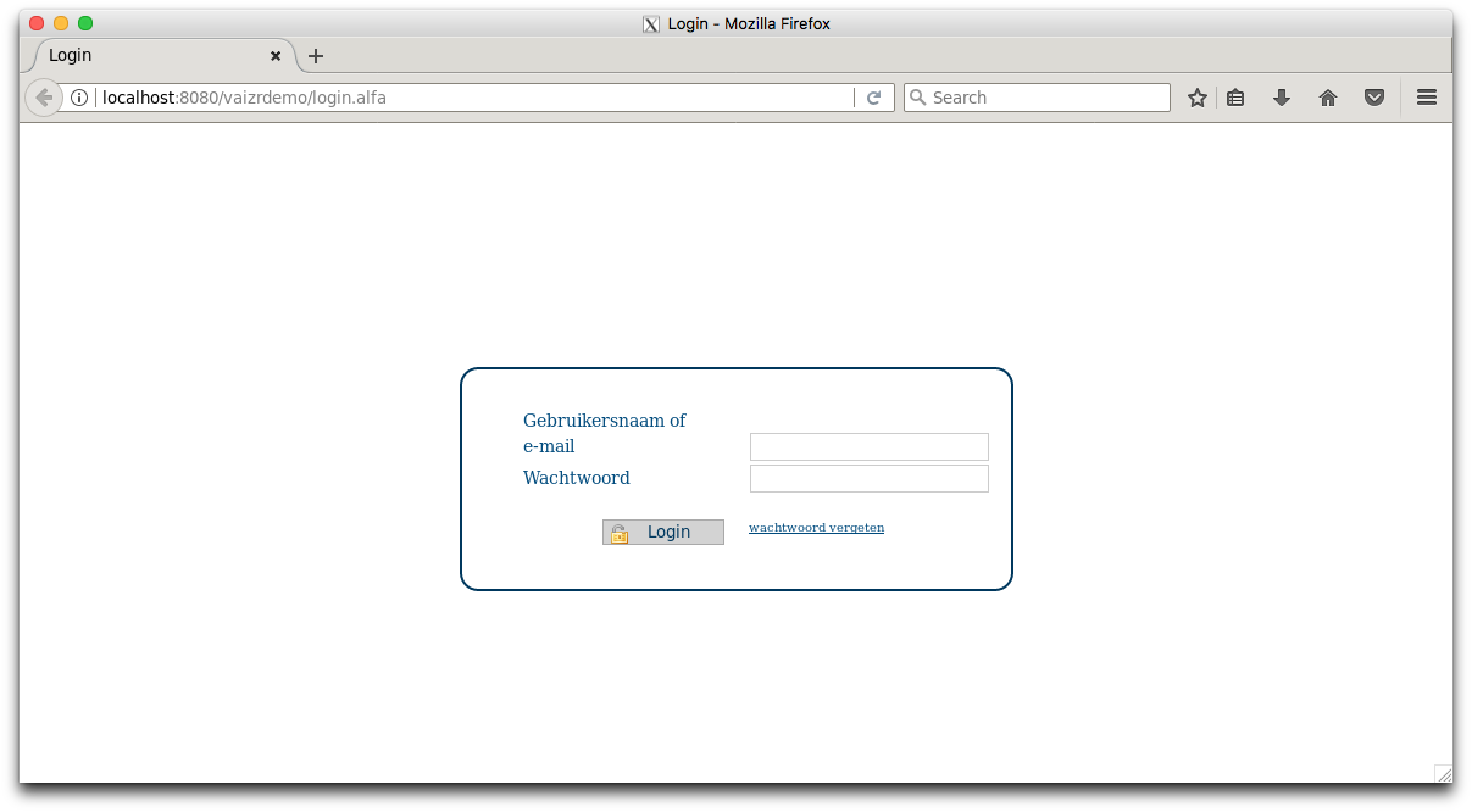
If everything is alright you should see the above screen. You can also use any browser on your Mac directly
URL http://localhost:8080/vaizrdemo
You can login with:
username : nanne
password : nanneo
Click Here to return to Getting Started
Click Here to continue with Generate Screens